StreamMonitor gives broadcast engineers instant visibility into hundreds of live audio streams — with intelligent alerting, real-time level meters, and AI-powered muting suggestions.
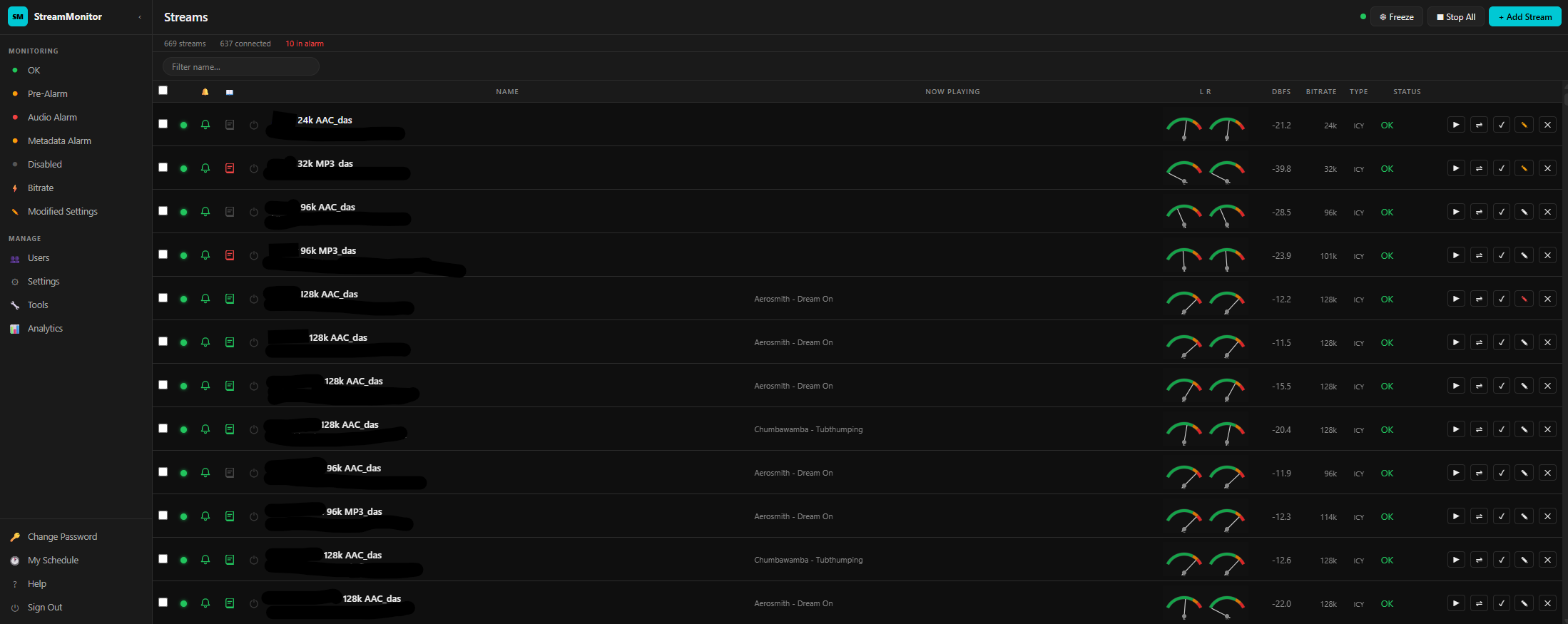
Monitor hundreds of simultaneous streams from a single view — with per-stream audio metering, metadata, bitrate tracking, and one-click controls.
Real-time left and right channel level meters with dBFS readings for every stream, updated continuously via WebSocket.
Track title and artist from ICY metadata displayed live for every stream. Metadata silence triggers its own dedicated alarm tier.
Monitor actual measured bitrate alongside the expected rate. Automatic alerts when bitrate falls outside acceptable bounds.
Instantly filter to streams in alarm, pre-alarm, disabled, or with custom alert configs. Find problems in seconds, not minutes.
Lock the current stream order while monitoring. Streams keep updating but won't reorder — ideal for watching a specific group during an incident.
Start or stop every stream in a single click. A confirmation dialog prevents accidents, and the button updates its label based on current state.
A staged alerting model means you always know how serious a problem is before you act on it. Filter to any tier instantly from the sidebar.
Stream is connected, audio is present, metadata is flowing, and bitrate is within bounds.
A condition is developing — audio or metadata is borderline but hasn't crossed the full alarm threshold yet.
Audio silence detected. The stream is connected but no audio signal is present above the configured level.
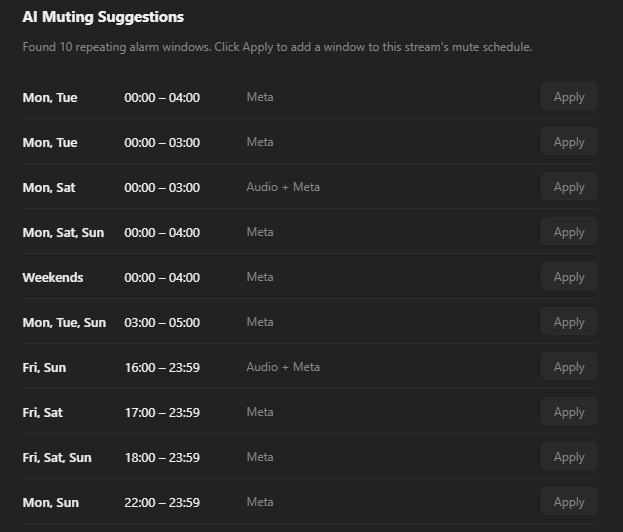
StreamMonitor analyzes alarm history to identify recurring patterns — overnight windows, weekend gaps, scheduled downtime — and suggests mute schedules with one click.
Multi-tenant user management with four permission levels — from view-only users to group administrators and owner admins managing large stream fleets.
Create users, assign groups, manage roles, and control which streams each group sees. New users receive email invites automatically.
Override global alerting thresholds on any individual stream. Set custom silence timeouts, bitrate tolerances, and mute schedules per stream.
Schedule recurring mute windows for streams with known downtime. Audio and metadata alarms can be muted independently on any day/time cadence.
Track alarm events, stream uptime, and system usage over time. Identify chronically problematic streams and usage trends across your fleet.
Bulk import streams via CSV with automatic duplicate detection. Export your full stream list and configuration for backup or migration.
Runs on your own infrastructure. Token-based authentication, role-gated API endpoints, and no dependency on third-party monitoring services.
Sign in to your StreamMonitor dashboard and get real-time visibility in seconds.
Sign Up for StreamMonitor →